The View Options window
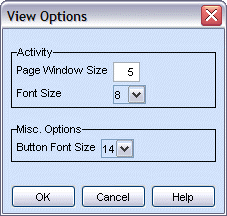
The View Options window from the Configure menu contains configuration options related to the different Talon views. Depending on your rights, you may only see a subset of the available options. Administrator users will see all of the settings in the View Options window.
|
Activity |
|
|
Page Window Size |
Sets how many messages to display in the Activity view. The default value is 10 messages. To increase the performance in the Activity view, set this option to a lower value. |
|
Font Size |
Select the font size used in the Activity view. |
|
Misc. Options |
|
|
Button Font Size |
Allows you to configure the size of the on-screen buttons. |
|
The View Options window |
|