The Options window
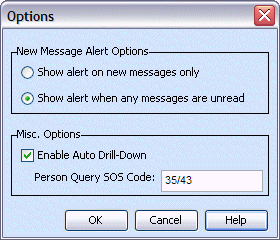
The Options window from the Configure menu contains general configuration options for Talon.
|
Engine Options |
NOTE: Engine Options are only available in Administrator mode. |
|
Save Case in XML |
Saves the case in an XML format. |
|
Create Folders for Queries |
Set whether a set of folders should be created for each query run. When running Talon MDC, uncheck this option. Otherwise, this option should remain checked. |
|
New Message Alert Options |
|
|
Show alert on new messages only |
Displays an alert image when a new message arrives. |
|
Show alert when any messages are unread |
Displays an alert image when a new message arrives and keeps displaying it until all messages are read. |
|
Misc. Options |
|
|
Enable Auto Drill-Down |
When checked, Talon will automatically send OLN and Person queries from the results of a Plate query. |
|
Person Query SOS Code |
Used with the auto drill-down option, allows you to specify what type of SOS query to run when a Person Query is automatically run. |
|
The Options window |
|