The Print Options window
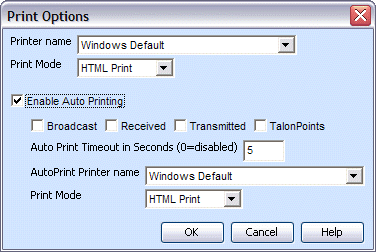
The Print Options window from the Configure menu contains configuration options for manual and auto printing.
|
Manual Print Options |
|
|
Printer Name |
Select the printer to use for manual printing. |
|
Print Mode |
Select if messages should print in HTML, Plain Text or Dot Matrix format. If using a generic text only printer, you should change this option to Plain Text or Dot Matrix. The default value is HTML. NOTE: Images will only be printed when using HTML formatting. |
|
Auto Printing Options |
|
|
Enable Auto Printing |
Automatically prints your messages as they are produced, based on the below options. |
|
Broadcast |
Check this option to print broadcast messages received. |
|
Received |
Check this option to print messages received from LEIN. |
|
Transmitted |
Check this option to print messages you transmitted from Talon. |
|
TalonPoints |
Check this option to print messages you received from TalonPoints. |
|
Auto Print Timeout in Seconds (0=disabled) |
This option can be used to configure a timeout for your auto print jobs. Setting this option configures how long to wait before sending the message to the printer. Set it to 0 to disable the timeout feature. |
|
AutoPrint Printer name |
Select the printer to use for auto printing. |
|
Print Mode |
Select if messages should print in HTML, Plain Text or Dot Matrix format. If using a generic text only printer, you should change this option to Plain Text or Dot Matrix. The default value is HTML. NOTE: Images will only be printed when using HTML formatting. |
|
The Print Options window |
|