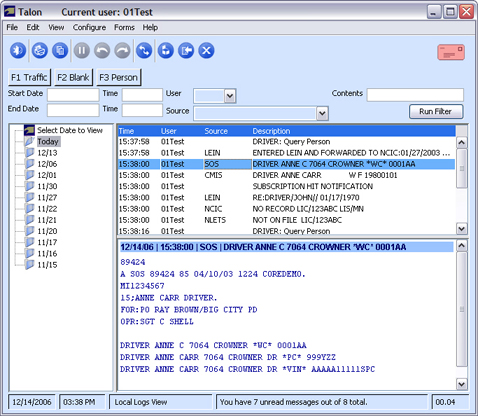
Talon keeps a local log of all the messages run on a specific computer. In the local logs, you can view messages from all users who used Talon on that computer. To view the local logs, select Local Logs from the View menu.
In the Local Logs view, messages are sorted in folders by the day they were run. To view the messages for a specific day, select the appropriate folder.
NOTE: Messages cannot be deleted from this view. Messages older than 30 days will be automatically deleted.
In addition to viewing all messages for a specific date, you can do additional filtering to search for specific messages. The following are the different filter options.
|
Start Date |
Start search on this date. Valid format: MM/DD or MM/DD/YY. |
|
End Date |
End search on this date. Valid format: MM/DD or MM/DD/YY. |
|
Start Time |
Start search at this time every day. Valid format: HH, HH:MM or HH:MM:SS. |
|
End Time |
End search at this time every day. Valid format: HH, HH:MM or HH:MM:SS. |
|
User |
Search only for messages to/from this user. |
|
Source |
Search only for messages from this source. |
|
Contents |
Search for messages that contain words specified in this field. |
After you have entered the desired filter, click [Run Filter]. This will display only the folders and messages that match your search criteria.