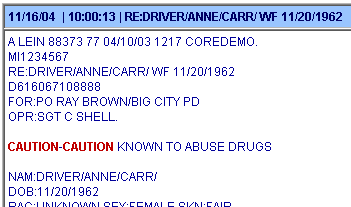
Talon gives you the ability to define what words and phrases you wish to emphasize within a message. There may be certain phrases that you want to stand out so you can quickly know if a subject is dangerous.
To get started defining your highlights:
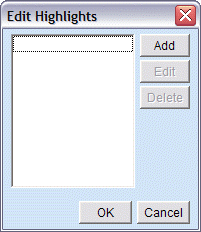
Select Edit Highlights from the Configure menu. The Edit Highlights window will open.
Click [Add] to create a new highlight definition.
Enter a single word or phrase you wish to be highlighted in the Search for field.
Indicate how you want the phrase to be highlighted - bold, italics and/or color change.
Select if only the word, the whole line where the phrase appears, or the whole paragraph where the phrase appears should be highlighted.
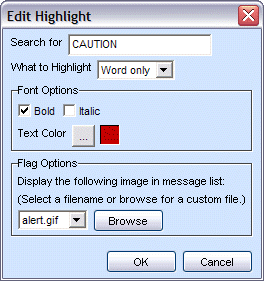
Click [OK] to save your new highlight. You will be returned to the Edit Highlights list.
Click [OK] to exit and save your highlights, or click [Add] to create a new highlight, [Edit] to change an existing definition, or [Delete] to remove a highlight.
Your messages should now reflect your highlight definitions.