The Change Password window
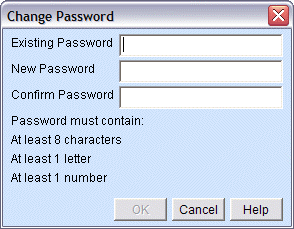
If you need to change your password for Talon, select Change Password from the Configure menu.
To change your password:
Enter your existing password in the Existing Password field.
Enter your new password in the New Password field
Re-enter your new password in the Confirm Password field.
Click [OK] to change your password.
|
NOTE |
[OK] will only undim if the values in the New Password and Confirm Password fields match, and if the new password meets the password requirements listed on the window. |
|
The Change Password window |
|